What the major platforms offer
Instagram has supervision tools letting a parent see time spent and who their teen follows, and set daily limits. The teen has to accept supervision, and can end it.
TikTok's Family Pairing links accounts and allows screen-time limits with a parent-set passcode, which is better, though a teen can create a second unlinked account in about a minute.
YouTube offers supervised experiences with content-level restrictions, which work reasonably well for younger users and become easy to route around with age.
The common shape: controls exist, they're genuinely better than nothing, and every one of them depends on the teenager continuing to cooperate.
Device-level controls are usually the better first step
Apple's Screen Time and Google's Family Link sit below the apps, which is the right place for a limit to live. App limits, downtime windows and content restrictions all apply regardless of what any individual platform offers.
They're also harder to circumvent than in-app settings, since bypassing them means bypassing the device rather than the app.
They're not perfect, a determined teenager finds workarounds, and the passcode-guessing problem is real, but they cover every app at once rather than requiring you to configure each one.
If you're setting anything up for the first time, start here. A platform's own controls are a supplement, not a replacement.
The problem no control solves
Time limits address how long, not what happens during that time. A teenager spending an hour on a feed ranked to maximise engagement is having a different experience from one spending an hour in a chronological feed, and no timer changes that.
Researchers have been documenting this distinction for several years. The American Psychological Association's health advisory on adolescent social media use is a measured summary: its recommendations are about the nature of the use, not only the quantity.
The design features that concern researchers most, infinite scroll, algorithmic recommendation, engagement-optimised ranking, advertising targeted at minors, are not things a parental control can turn off.
Which means the platform matters as much as the limit.
How Kindred's controls work
Family accounts and parental controls are free. Anyone 18 or over can start a family group, invite up to five more people and add teens aged 13 to 17, no subscription needed.
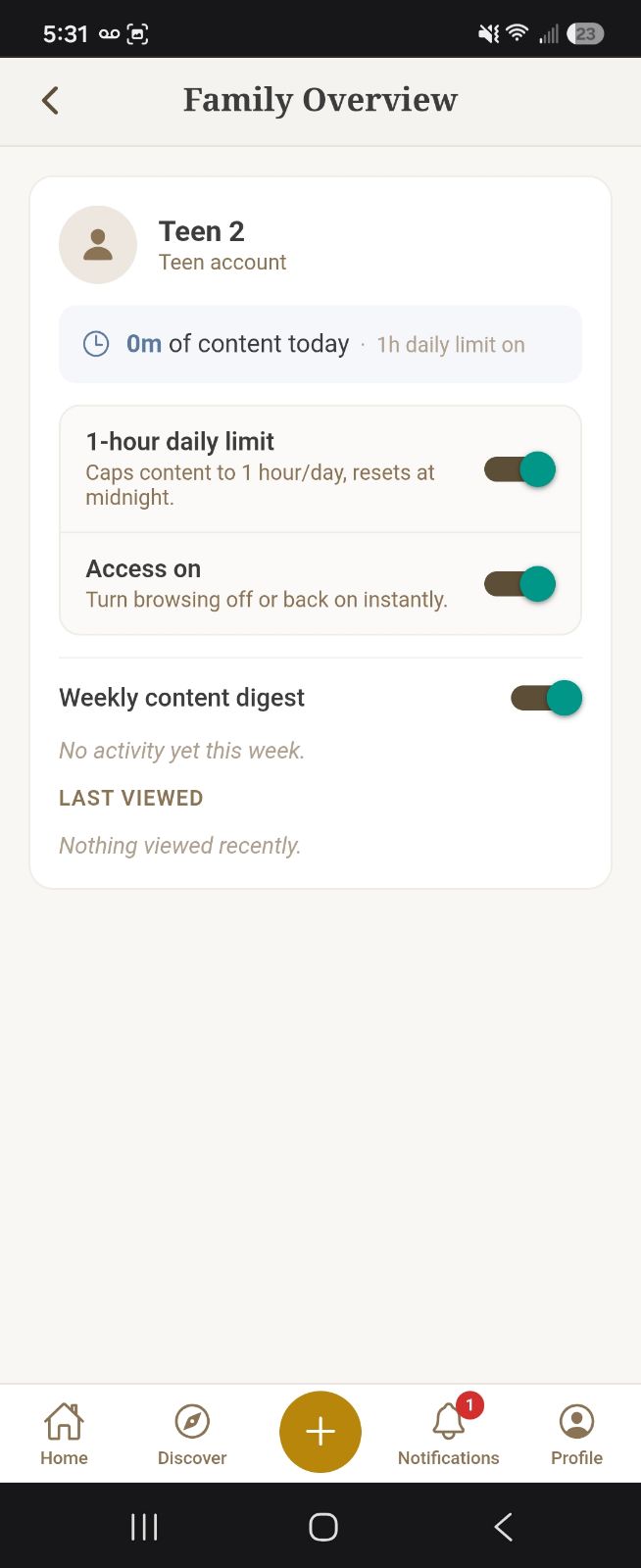
Each teen in a family group has a one-hour daily content limit. When they reach it, browsing stops for the day. A parent in the group can turn the limit on or off for each teen, and can pause a teen's browsing straight away.
The teenager cannot change any of it. The controls aren't settings on their account: they're set by a parent in the group and stored on our side, and the teen's app follows them. A teen joins by accepting an invitation, which tells them what the controls are before they do.
A parent can also turn on a weekly digest in the Parent Dashboard showing what each teen viewed over the past seven days, so a conversation about screen time can start from something factual rather than a guess.
Videos already playing are allowed to finish rather than cutting off mid-way. A hard stop in the middle of something is how features like this end up resented and worked around.
What's different about the platform itself
No advertising anywhere. Not in the feed, not targeted at teenagers, not building a profile from what they look at. Kindred is funded by subscriptions, so there's no advertiser buying access to anyone.
The feed is chronological: posts from people they followed, in order. Nothing is ranked for engagement, and no recommended content from strangers is inserted.
The feed ends. When they reach posts they've seen, they've caught up. There's no infinite scroll to make stopping a decision they have to keep making.
Content is moderated automatically on upload, with reporting and blocking on every post and profile.

Being honest about the limits of this
Kindred is small. Their friends are probably not on it, and for many teenagers that's the whole argument.
It doesn't replace the platforms they're already using. Realistically it sits alongside them, and the honest version of the pitch is that it's a better place for some of their time rather than a substitute for all of it.
Family accounts and parental controls are free. Kindred itself is free to join, with no credit card required, and it is funded by subscriptions rather than advertising. There is an optional paid Family plan, which makes every member of a group a paid member and funds the creators they watch: nothing about the controls depends on it.
And Kindred is 13 and over. A date of birth is collected at signup and enforced; accounts for anyone younger are refused. This isn't a children's platform and we'd rather say so than let the word family imply otherwise.
Common questions
Do I need to pay for parental controls?
No. Family accounts and parental controls are free. Start a family group, invite your teen, and the controls work without a subscription.
Can my teenager turn off Kindred's time limit?
No. The daily content limit is set by a parent in the family group, and the teen it applies to can't change it.
What age is Kindred for?
13 and over. A date of birth is collected at account creation and enforced server-side; accounts for anyone under 13 are refused.
Are device-level controls better than in-app ones?
Generally yes, as a first step. Apple Screen Time and Google Family Link apply across every app and are harder to circumvent. Platform controls are a supplement rather than a replacement.
Does Kindred show ads to teenagers?
There is no advertising anywhere in Kindred, for anyone. It's funded by subscriptions, so there's no advertiser buying access to your teenager's attention and no profile being built to sell.
Can I see what my teenager is doing on Kindred?
In a family group, a parent can turn on a weekly digest in the Parent Dashboard showing what each teen viewed over the past seven days. It's designed to support a conversation rather than to provide surveillance of every interaction.
What does the Family plan add?
Nothing about the controls: those are free. The optional Family plan makes every member of your family group a paid member, which funds the creators you watch. It is priced per person, monthly or annually; pricing is shown when you add it, and a payment method is required.